Out of the box BGINFO includes a number of predefined fields that can be used to display information on the desktop such as Computer name, IP Address etc. But if the standard fields aren’t enough,BGINFO allows creating custom fields that can pull data from various sources like WMI, Registry, File content, Environment variables or VBScript.
The below example shows how to embed VBSCRIPT code output in BGINFO. First we create a VBSCRIPT file called comp.vbs that has the following content. (Credit for the script goes to Moral Volcano)
winmgt = “winmgmts:{impersonationLevel=impersonate}!//” Set oWMI_Qeury_Result = GetObject(winmgt).InstancesOf(“Win32_ComputerSystem”)
For Each oItem In oWMI_Qeury_Result Set oComputer = oItem Next
If IsNull(oComputer.Model) Then sComputerModel = “no-name model” Else If LCase(oComputer.Model) = “system product name” Then sComputerModel = “Custom-built PC” Else sComputerModel = oComputer.Model End If End If
If IsNull(oComputer.Manufacturer) Then sComputerManufacturer = “no-name manufacturer” Else If LCase(oComputer.Manufacturer) = “system manufacturer” Then sComputerManufacturer = “some assembler” Else sComputerManufacturer = oComputer.Manufacturer End If End If
sComputer = Trim(sComputerModel) & " by " & Trim(sComputerManufacturer) Echo sComputer
If you were to launch this script, you will get an error message saying that there is a type mismatch, this is caused by the line that starts with the word **Echo **because Echo is not a valid vbscript command, normally you would use the wscript.echo command. But for the use with BGINFO we must use the above syntax as this is what gets parsed back to BGINFO
So whenever you create a vbscript that is used with BGINFO you must include the command Echo <variable to return>
Then we open BGINFO and follow the steps as illustrated below.
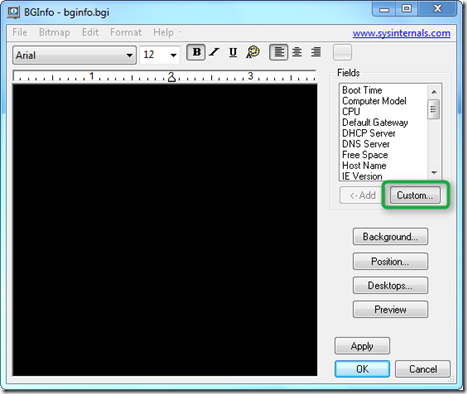
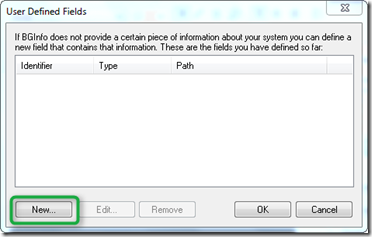
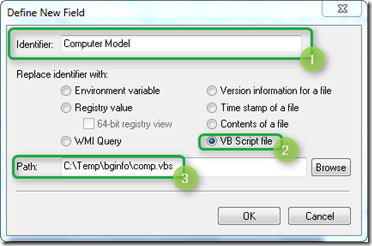
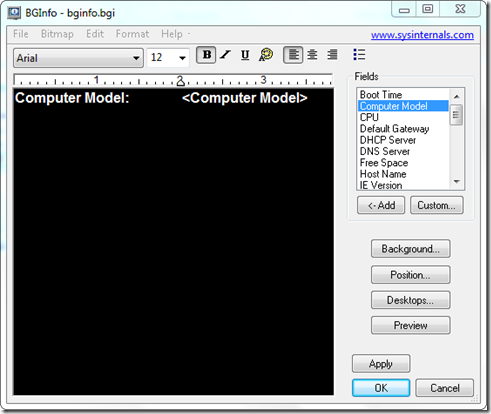
When done we’re saving the configuration, in this case to bginfo.bgi. And finally we launch BGINFO using the following command line.
“BgInfo.exe” “bginfo.bgi” /timer:0 /silent /nolicprompt
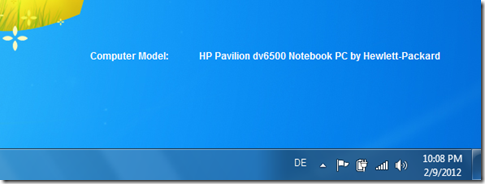
and get the following result.
If you’re looking for more ideas I recommend you have a look at the BgInfo VBScript Add-On scripts created by Moral Volcano here.