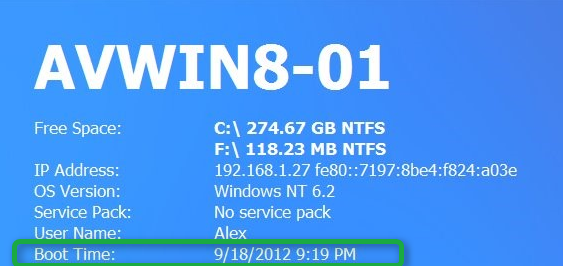
Last week I noticed that the Boot Time shown on my BGInfo generated desktop wallpaper had a date of several days ago. This is because of the new Fast Startup feature introduced with Windows 8.
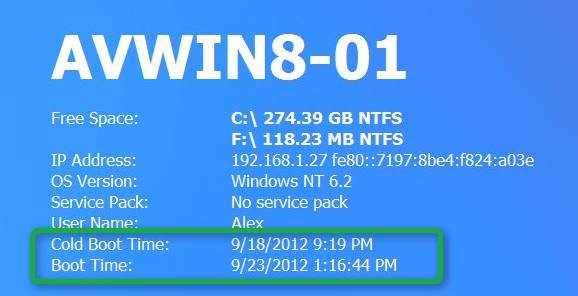
In short, when you shutdown Windows 8 the kernel session is hibernated, so the next time you power on your computer the system starts from that hibernated session. When you initiate a Restart then the system does not hibernate the kernel session but really performs a cold boot. The default boot time shown in BGInfo only shows the cold boot time.
For more details about Fast Boot I recommend reading Shutdown and Fast startup in Windows 8 and Delivering fast boot times in Windows 8
Here’s my BGInfo generated desktop wallpaper I had first.
And here the new one that shows the Cold Boot time and the time when the system did a fast startup.
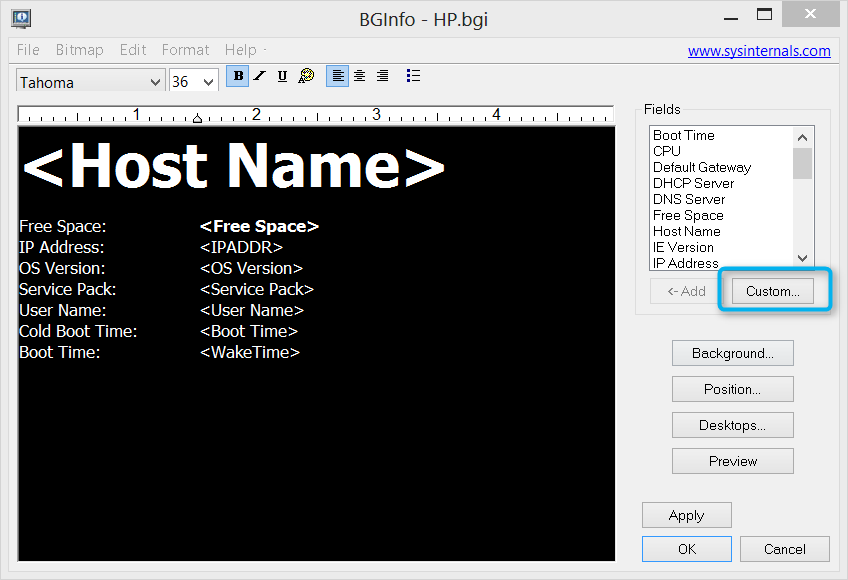
To add this to your own BGInfo template, copy the code below into a file called bg_wakeuptime.vbs and copy the script file into the BGInfo application folder. Then open BGInfo.exe, select the Custom button
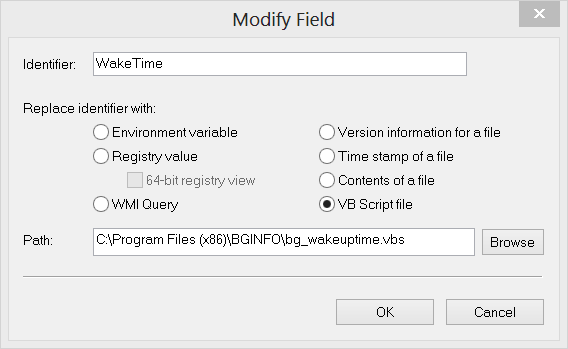
Create a ne field that has the following properties
‘==================================================================================================’ ’ NAME: bg_wakeuptime.vbs ' ’ AUTHOR: Alex Verboon / Claude Henchoz ' ’ DATE: 22.09.2012 ' ’ PURPOSE: Read last Wakeup and Sleep time from Windows Eventlog ' ’ PRE-REQUISITES: Windows 7 / Windows 8 ' ’ USAGE: Run from BGINFO ’ If you want to run the script directly then remove the line “Echo xWakeTime” ’ and uncomment the lines below “Print local dates” ' ’ EXITCODES: none ' ’ CREDITS: http://www.w3.org/TR/xmlschema-2/#dateTime ’ http://technet.microsoft.com/en-us/library/ee156576.aspx ’ Microsoft Technet Forums ’ Claude Henchoz for Code optimization ' ' ’ VERSIONCONTROL: Date Version Modified by Changes ’ —- ——- ———– ————- ’ 22.09.12 1.0 av/ch Initial version ‘==================================================================================================
‘Initialize Set WMI = GetObject(“winmgmts:”) Set Sh = CreateObject(“WScript.Shell”) Set RE = New RegExp RE.Global = True RE.Pattern = “\d+”
‘Run query Set Evt = WMI.ExecQuery(“select * from Win32_NTLogEvent where " & _ “Logfile = ‘System’ and " & _ “SourceName = ‘Microsoft-Windows-Power-Troubleshooter’ and " & _ “EventCode = ‘1’”)
if Evt.Count = 0 Then ’ no events found xWakeTime = “Never” xSleeptTime = “Never” Else
'Extract dates from first hit
For Each Line In Split(Evt.ItemIndex(0).Message,vbNewLine)
        Select Case Left(Line, 6)
    Case "Sleep "
                SleepDateUTC = DateFromEventDate(Line)
            xSleepTime = UTC2LocalDate(SleepDateUTC)
        Case "Wake T"
                WakeDateUTC = DateFromEventDate(Line)
            xWakeTime = UTC2LocalDate(WakeDateUTC)
    End Select
Next
End if
‘Print local dates ‘WScript.echo “SLEEP: " & xSleepTime ‘WScript.echo “WAKE : " & xWakeTime
Echo xWakeTime
‘==================================================================================================
‘Functions ‘==================================================================================================
‘Functions Function DateFromEventDate(EventString) Set DateParts = RE.Execute(EventString) DateYear = DateParts(0) DateMonth = DateParts(1) DateDay = DateParts(2) DateHour = DateParts(3) DateMinute = DateParts(4) DateSeconds = DateParts(5) DateDecimal = DateParts(6) DateFromEventDate = CDate(DateDay & “/” & DateMonth & “/” & DateYear & " " & _ DateHour & “:” & DateMinute & “:” & DateSeconds) End Function
Function UTC2LocalDate(UTCDate) Offset = Sh.RegRead(“HKEY_LOCAL_MACHINE\System\CurrentControlSet" & _ “Control\TimeZoneInformation\ActiveTimeBias”) UTC2LocalDate = DateAdd(“n”,-Offset,UTCDate) End Function