During the past weeks I have spend a bit of time with Citrix XenDesktop 5 and while I was busy creating Desktop Groups, updating Master images, I thought i t could be helpful to see some information directly on the desktop. Show things on the desktop?, okay that’s a no-brainer, BGInfo from Sysinternals is what we need.
So I created a template for BGInfo that just shows the information I need when using XenDesktop.
The user that’s logged on
The domain the user is logged on
The IP Address
The Boot Time of the system
The XenDesktop group the VM belongs to
The Citrix Farm name
The version of the master image
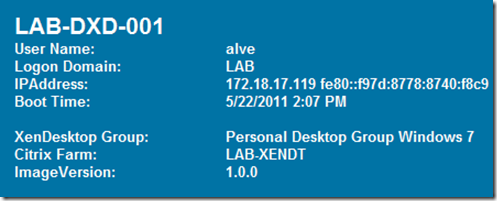
To avoid any (none) IP Address entries, I used the trick as explained by John Baker here To obtain information about the XenDesktop Group and Citrix Farm I let BGInfo query the following registry keys:
HKEY_LOCAL_MACHINE\SOFTWARE\Citrix\VirtualDesktopAgent\State\DesktopGroupName
HKEY_LOCAL_MACHINE\SOFTWARE\Citrix\VirtualDesktopAgent\State\FarmName
and for the Image version, I query a custom registry key I have stored in the master image to define the image version.
HKEY_LOCAL_MACHINE\SOFTWARE\FooCorp\ImageVersion
The BGInfo template can be downloaded from here
Deployment of the BGInfo utility and the automatic startup can be configured through Group Policy. For my environment where I already have a GPO called VDI_Desktop_Pooled and VDI_Desktop_Personal I added the following configuration.
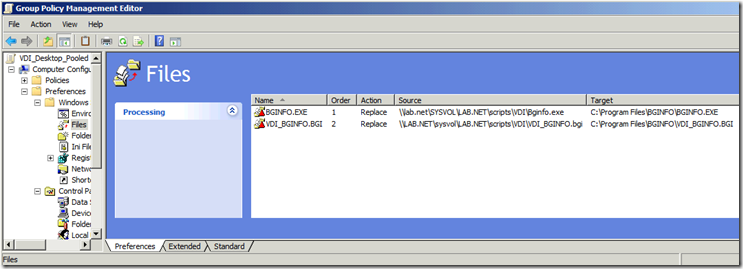
Under Computer Configuration, Preferences I have configured a GP Preference to copy bginfo.exe and the bginfo template to the c:\program files\bginfo folder.
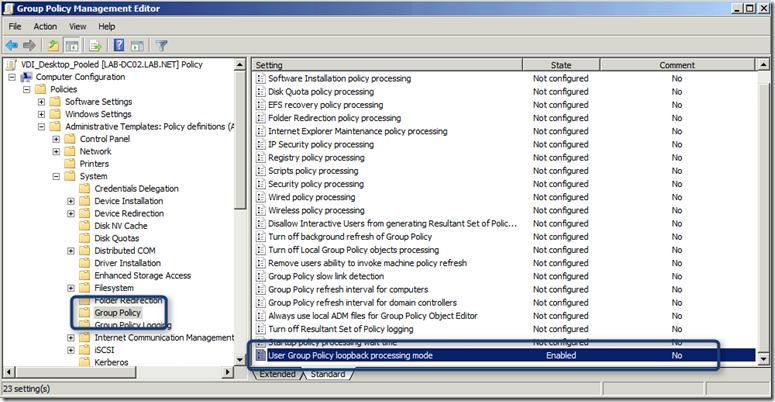
Then under Computer Configuration, Policies, Administrative Templates, System, Group Policy I have enabled Group Policy loopback processing mode, this to ensure that the next Preferences setting that I have configured under User Configuration applies correctly.
Under User Configuration, Preferences, Windows Settings, Registry I added the following configuration:
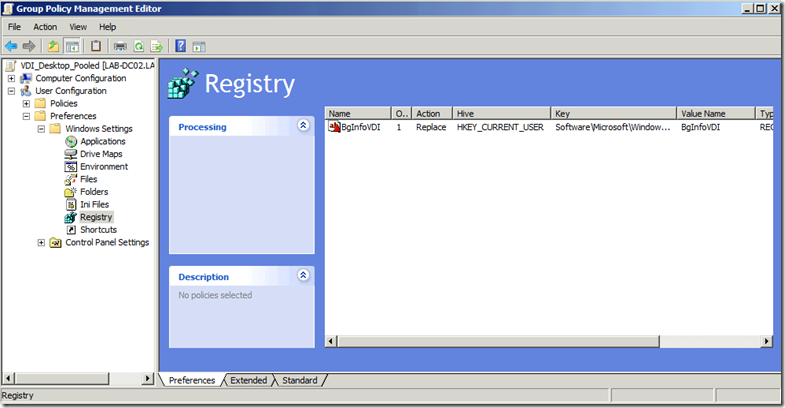
Hive HKEY_CURRENT_USER Key Path Software\Microsoft\Windows\CurrentVersion\Run Value Name BGINFOVDI Value Type REG_SZ Value Data "C:\Program Files\BGINFO\BGINFO.EXE" "C:\Program Files\BGINFO\VDI_BGINFO.bgi" /timer:0 /silent /nolicprompt That’s it, Enjoy