Today someone in a forum asked how to programmatically configure an application so that it runs in compatibility mode. Configuring this manually is easy, just open the file’s properties, select the Compatibility tab and apply the required settings. On Windows 7 this then looks as shown in the picture below.
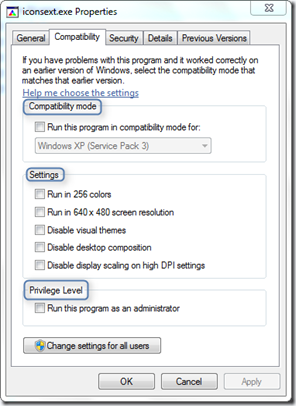
Now whatever we configure here, it all gets written to the following location in the Windows Registry:
HKEY_CURRENT_USER\Software\Microsoft\Windows NT\CurrentVersion\AppCompatFlags\Layers
If the settings have to apply for all users the information must be stored here:
HKEY_LOCAL_MACHINE\Software\Microsoft\Windows NT\CurrentVersion\AppCompatFlags\Layers
When configuring compatibility mode settings for an application executable, shortcut or batch file, a registry string is created for each item.
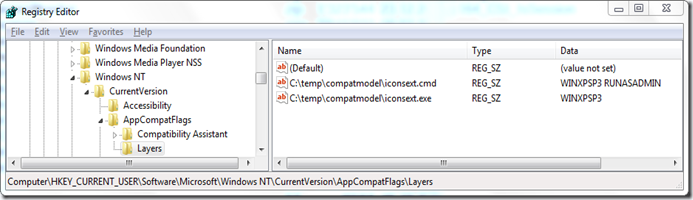
For each application there are three settings that can be applied. The compatibility mode, (Display) Settings and the Privilege Level. One or multiple values can be set (separated by a space).
Compatibility Modes
**Value** **Description** WIN95 Windows 95 WIN98 Windows 98 WIN4SP5 Windows NT 4.0 SP5 WIN2000 Windows 2000 WINXPSP2 Windows XP SP2 WINXPSP3 Windows XP SP3 VISTARTM Vista VISTASP1 Vista SP1 VISTASP2 Vista SP2 WIN7RTM Windows 7 WINSRV03SP1 Windows Server 2003 SP1 WINSRV08SP1 Windows Server 2008 SP1
Display Settings
**Value** **Description** DISABLETHEMES Disable Visual Themes 640X480 Run in 640 x 480 screen resolution HIGHDPIAWARE Disable display scaling on high DPI settings 256COLOR Run in 256 colors DISABLEDWM Disable Desktop Composition
Privilege Level
**Value** **Description** RUNASADMIN Run program as an administrator
If the settings are written into the HKEY_LOCAL_MACHINE part of the registry, the settings cannot be changed by a user that has no local administrative rights.
The following registry command line applies Windows XP SP3 compatibility mode and defines the application to run as administrator.
REG ADD “HKLM\SOFTWARE\Microsoft\Windows NT\CurrentVersion\AppCompatFlags\Layers” /v “C:\temp\compatmodel\iconsext.exe” /t REG_SZ /d “WINXPSP3 RUNASADMIN” /f