When opening the Virtual Machine Settings Integration Services node in Hyper-V running on Windows 8.1 Preview, you will notice that there is now an additional Integration Service listed called Guest Services. By default the service is not enabled,
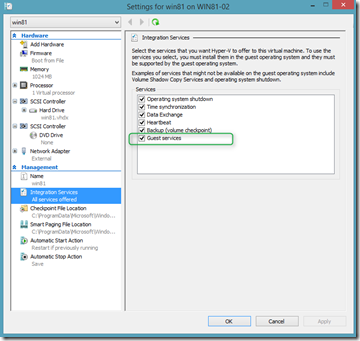
With this integration service enabled, you can now directly copy a file from a remote system into the VM without utilizing a network connection. A new PowerShell cmdlet Copy-VMFile has been added for this new feature.
The following example first enables the Guest Services Integration service and then copies a file from the VM host system into the running VM.
Enable-VMIntegrationService -VMName "win81" -Name "Guest Service Interface" -ErrorAction Continue
Copy-VMFile -Name "win81" -SourcePath "C:\data\test.txt" -DestinationPath "c:\data\test.txt"  -FileSource Host -Force