During the past days I have been manually updating a few Windows 7 clients and on two of them I received the error 0x800fa12.
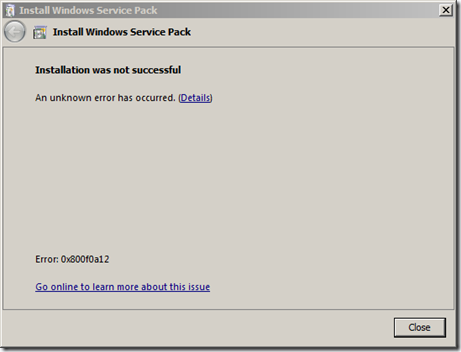
When clicking on the Go online link Microsoft mentions the several reasons that could lead to this error.
The system partition isn’t automatically mounted, or made accessible to Windows, during startup.A hard disk containing the system partition was removed prior to beginning SP1 installation.Windows is running on a storage area network (SAN), and access to the system partition has been disabled.A disk management tool from another software manufacturer was used to copy (or clone) the disk or partition on which you’re trying to install SP1Knowing my systems I could immediately exclude cause 2,3 and 4, so took a closer look at cause 1. Running the command MOUNTVOL /L showed the following result:
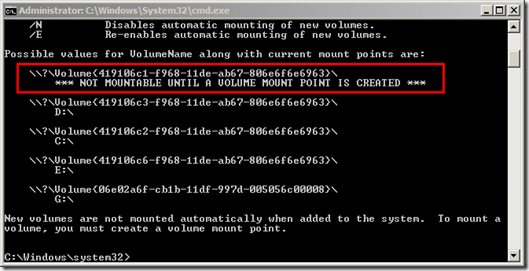
I than ran DISKPART and got the following result. In fact the 100MB sized System Partition was Offline.
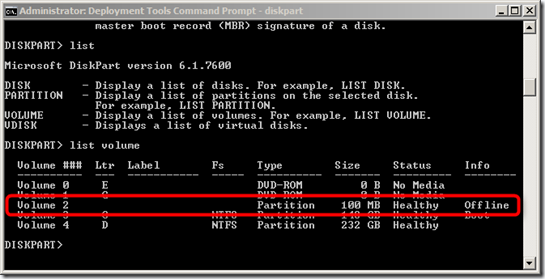
as per Microsoft’s recommendation I then executed MOUNTVOL /E which re-enables automatic mounting of new volumes and then rebooted the system. Once rebooted I executed MOUNTVOL again and got the following result.
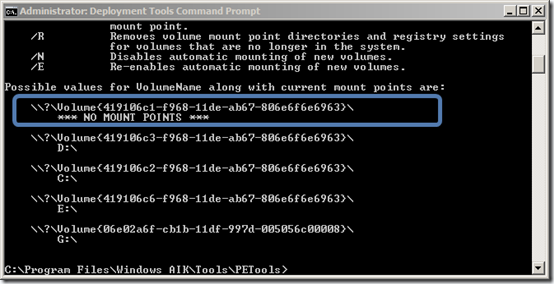
When executing DISKPART the results were as following:
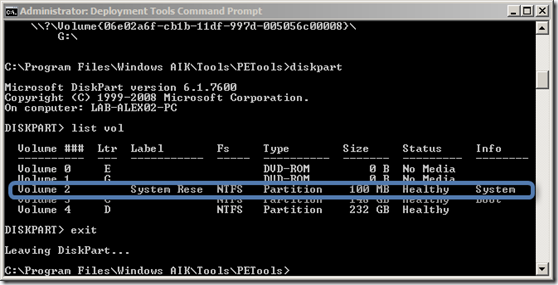
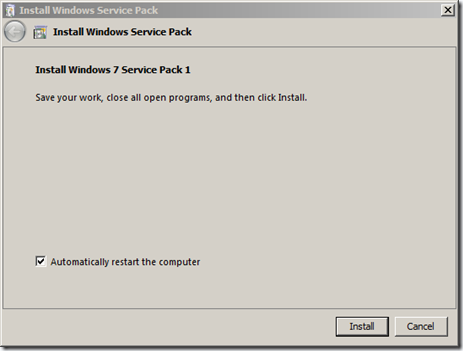
When Launching the Service Pack 1 installer again no issues were detected and installation could continue.
Why this actually happened I don’t know. Windows 7 by default has the automount feature enabled. The current status of automount can be checked by looking at the following registry key.
HKEY_LOCAL_MACHINE\SYSTEM\CurrentControlSet\Services\MountMgr\NoAutoMount
If the value is set to 1: This indicates that Automatic mounting of new volumes is Disabled. If the value is set to 0: This indicates that Automatic mounting of new volumes is Enabled.
Additional information on this issue can be found here.