While reading the Microsoft Whitepaper Diagnosing Application Compatibility Issues Affecting Windows Power Management I came across a utility called PwrTest that can be used to diagnose sleep reliability issues and more… The below list shows the various options the tool provides.
                   **Scenario**

                    **Description**

                              sleep

                    for sleep/resume transition testing

                              battery

                    for battery information testing

                              info

                    for system capabilities information

                              es

                    for thread execution state changes

                              idle

                    for power idle statistics

                              ppm

                    for processor power management testing

                              timer

                    for system timer resolution statistics

                              disk

                    for disk idle statistics

                              device

                    for device idle statistics

                              monitor

                    for monitor dimming and blanking statistics

                              requests

                    for showing power requests

                              thermal

                    for ACPI thermal zone monitoring

                              processidle

                    for forcing idle/background tasks to be run

             PwrTest.exe is part of the Windows Driver Kit that can be downloaded from [here](http://www.microsoft.com/download/en/confirmation.aspx?id=11800). You will need to download an ISO file that is approx. 620 MB, but no worries, no need to install the Full Driver Kit to get this utility. When launching the installer, just select the Tools.
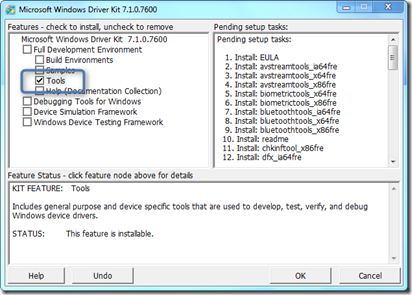
When accepting the default path, all tools will install under C:\WinDDK\7600.16385.1\Tools where you also find the Power Management folder that contains the PwrTest utility.