I just read a blog post from Ed Wilson (Scripting Guy) about Use PowerShell to Configure Windows Defender Preferences and wondered if there’s more here. And yes there is. If you have a default insallation of Windows 8 and have defender enabled or work in an enterprise environment and use Configuration Manager with the System Center Endpoint Security agent deployed on your clients then you the below listed cmdlets available.
Windows Defender
To get a list of all available Defender cmdlets just run the following command within a powershell console
Get-command -Module defender
System Center Endpoint Protection
For a list of all available SCEP cmdlets, run the following command within a powershell console.
Get-command -Module MpProvider
If no cmdlets are returned try first loading the module using the following command Import-Module “$env:ProgramFiles\Microsoft Security Client\MpProvider”
You will notice that the cmdlet names are quite similar, the only difference is that the cmdlets for SCEP have “Prot” within the name.
Windows Defender System Center Endpoint Protection Cmdlet ModuleName Cmdlet ModuleName Add-MpPreference Defender Add-MProtPreference MpProvider Get-MpComputerStatus Defender Get-MProtComputerStatus MpProvider Get-MpPreference Defender Get-MProtPreference MpProvider Get-MpThreat Defender Get-MProtThreat MpProvider Get-MpThreatCatalog Defender Get-MProtThreatCatalog MpProvider Get-MpThreatDetection Defender Get-MProtThreatDetection MpProvider Remove-MpPreference Defender Remove-MProtPreference MpProvider Remove-MpThreat Defender Remove-MProtThreat MpProvider Set-MpPreference Defender Set-MProtPreference MpProvider Start-MpScan Defender Start-MProtScan MpProvider Update-MpSignature Defender Update-MProtSignature MpProvider So what can we do here?
Update definitions
Antivirus and Spyware definitions can be updates as following:
Update-MProtSignature -UpdateSource MicrosoftUpdateServer
Starting a Scan
To start a scan use the following command. Available Scantypes are QuickScan, FullScan and CustomScan)
Start-MProtScan -ScanType QuickScan
When using the CustomScan option an the path must be provied using the -Scanpath parameter
Computer Protection Status
Computer protection status information is retrieved with the following command
Get-MpComputerStatus
Defender / SCEP Settings
Configuration settings can be gathered using
Get-MProtPreference
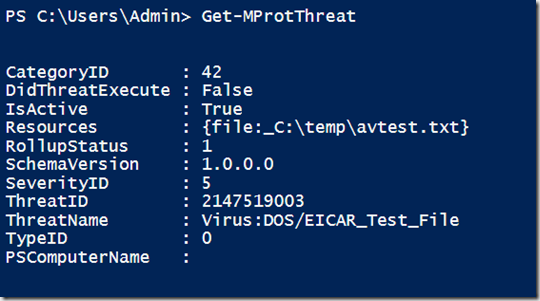
Find information about actual threat
To find out information about an actual threat on a client, run
Get-MProtThreat
Removing Threats
Although there is a Remove-MProtThreat cmdlet, it doesn’t seem to recognize the active threat, as i received the following message when executing it.

Configuration Changes
For configuratin settings, please refer to Ed Wilson’s blog post Use PowerShell to Configure Windows Defender Preferences
That’s it for today, now it has stopped raining and the sun starts to shine, so let’s get out of here
