Here’s a PowerShell script we recently wrote to show the source path location for all the content that we put into ConfigMgr. The Script lists all the content source paths for the following CM objects.
Applications
Driver Packages
Drivers
Boot Images
OS Images
Software Update Package Groups
Packages
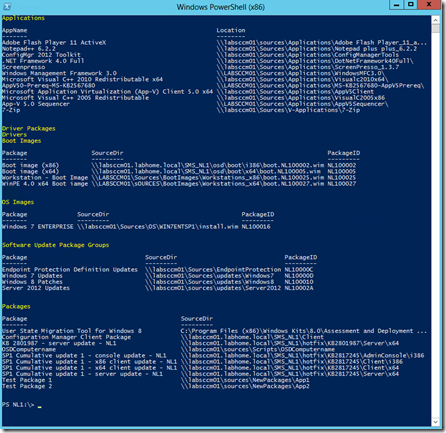
The output is as shown in the example below.
before executing the script, connect to your site.
clear-host
function GetInfoPackages()
{
$xPackages = Get-CMPackage | Select-object Name, PkgSourcePath, PackageID
$info = @()
foreach ($xpack in $xPackages)
    {
    #write-host $xpack.Name
    $object = New-Object -TypeName PSObject
    $object | Add-Member -MemberType NoteProperty  -Name Package -Value $xpack.Name
    $object | Add-Member -MemberType NoteProperty  -Name SourceDir -Value $xpack.PkgSourcePath
    $object | Add-Member -MemberType NoteProperty  -Name PackageID -Value $xpack.PackageID
    $info += $object
    }
$info
}
function GetInfoDriverPackage()
{
$xPackages = Get-CMDriverPackage | Select-object Name, PkgSourcePath, PackageID
$info = @()
foreach ($xpack in $xPackages)
    {
    #write-host $xpack.Name
    $object = New-Object -TypeName PSObject
    $object | Add-Member -MemberType NoteProperty  -Name Package -Value $xpack.Name
    $object | Add-Member -MemberType NoteProperty  -Name SourceDir -Value $xpack.PkgSourcePath
    $object | Add-Member -MemberType NoteProperty  -Name PackageID -Value $xpack.PackageID
    $info += $object
    }
    $info
}
function GetInfoBootimage()
{
$xPackages = Get-CMBootImage | Select-object Name, PkgSourcePath, PackageID
$info = @()
foreach ($xpack in $xPackages)
    {
    #write-host $xpack.Name
    $object = New-Object -TypeName PSObject
    $object | Add-Member -MemberType NoteProperty  -Name Package -Value $xpack.Name
    $object | Add-Member -MemberType NoteProperty  -Name SourceDir -Value $xpack.PkgSourcePath
    $object | Add-Member -MemberType NoteProperty  -Name PackageID -Value $xpack.PackageID
    $info += $object
    }
    $info
}
function GetInfoOSImage()
{
$xPackages = Get-CMOperatingSystemImage | Select-object Name, PkgSourcePath, PackageID
$info = @()
foreach ($xpack in $xPackages)
    {
    #write-host $xpack.Name
    $object = New-Object -TypeName PSObject
    $object | Add-Member -MemberType NoteProperty  -Name Package -Value $xpack.Name
    $object | Add-Member -MemberType NoteProperty  -Name SourceDir -Value $xpack.PkgSourcePath
    $object | Add-Member -MemberType NoteProperty  -Name PackageID -Value $xpack.PackageID
    $info += $object
    }
    $info
}
function GetInfoDriver()
{
$xPackages = Get-CMDriver | Select-object LocalizedDisplayName, ContentSourcePath, PackageID
$info = @()
foreach ($xpack in $xPackages)
    {
    #write-host $xpack.Name
    $object = New-Object -TypeName PSObject
    $object | Add-Member -MemberType NoteProperty  -Name Package -Value $xpack.LocalizedDisplayName
    $object | Add-Member -MemberType NoteProperty  -Name SourceDir -Value $xpack.ContentSourcePath
    $object | Add-Member -MemberType NoteProperty  -Name PackageID -Value $xpack.PackageID
    $info += $object
    }
    $info
}
function GetInfoSWUpdatePackage()
{
$xPackages = Get-CMSoftwareUpdateDeploymentPackage | Select-object Name, PkgSourcePath, PackageID
$info = @()
foreach ($xpack in $xPackages)
    {
    #write-host $xpack.Name
    $object = New-Object -TypeName PSObject
    $object | Add-Member -MemberType NoteProperty  -Name Package -Value $xpack.Name
    $object | Add-Member -MemberType NoteProperty  -Name SourceDir -Value $xpack.PkgSourcePath
    $object | Add-Member -MemberType NoteProperty  -Name PackageID -Value $xpack.PackageID
    $info += $object
    }
    $info
}
function GetInfoApplications {
    foreach ($Application in Get-CMApplication) {
        $AppMgmt = ([xml]$Application.SDMPackageXML).AppMgmtDigest
        $AppName = $AppMgmt.Application.DisplayInfo.FirstChild.Title
        foreach ($DeploymentType in $AppMgmt.DeploymentType) {
            # Calculate Size and convert to MB
             $size = 0
            foreach ($MyFile in $DeploymentType.Installer.Contents.Content.File) {
                $size += [int]($MyFile.GetAttribute("Size"))
            }
            $size = [math]::truncate($size/1MB)
            # Fill properties
            $AppData = @{
                AppName            = $AppName
                Location           = $DeploymentType.Installer.Contents.Content.Location
                DeploymentTypeName = $DeploymentType.Title.InnerText
                Technology         = $DeploymentType.Installer.Technology
                 ContentId          = $DeploymentType.Installer.Contents.Content.ContentId
                SizeMB             = $size
             }
            # Create object
            $Object = New-Object PSObject -Property $AppData
            # Return it
            $Object
        }
    }
 }
# Get the Data
Write-host "Applications" -ForegroundColor Yellow
GetInfoApplications | select-object AppName, Location, Technology | Format-Table -AutoSize
Write-host "Driver Packages" -ForegroundColor Yellow
GetInfoDriverPackage | Format-Table -AutoSize
Write-host "Drivers" -ForegroundColor Yellow
GetInfoDriver | Format-Table -AutoSize
Write-host "Boot Images" -ForegroundColor Yellow
GetInfoBootimage | Format-Table -AutoSize
Write-host "OS Images" -ForegroundColor Yellow
GetInfoOSImage | Format-Table -AutoSize
Write-host "Software Update Package Groups" -ForegroundColor Yellow
GetInfoSWUpdatePackage | Format-Table -AutoSize
Write-host "Packages" -ForegroundColor Yellow
GetInfoPackages | Format-Table -AutoSize
Thanks to Claude Henchoz for helping me out with the the Applications function.