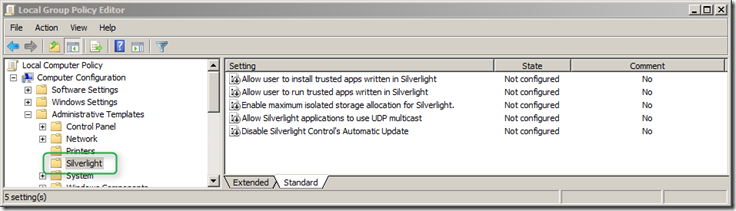
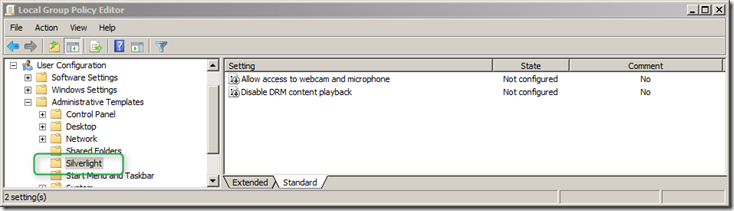
On the Microsoft Silverlight website you will find a page that describes the available Group Policy Settings for Silverlight as well as the content for the ADMX and ADML file. But… it doesn’t work because the code on the web contains a bug and a section is missing.
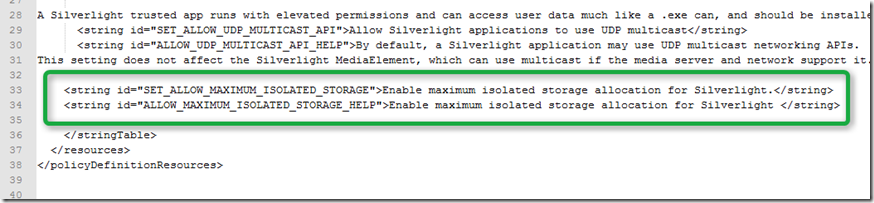
Within the silverlight.admx there is an unnecessary space and within the silverlight.amdl the section for SET_ALLOW_MAXIMUM_ISOLATED_STORAGE and ALLOW_MAXIMUM_ISOLATED_STORAGE_HELP is completely missing.
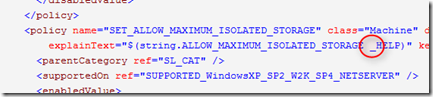
To get the Silverlight GPO working remove the space from ALLOW_MAXIMUM_ISOLATED_STORAGE_HELP and add the following section to the silverlight.adml file.
Then copy the files to your central store (\Lab.net\sysvol\LAB.NET\Policies\PolicyDefinitions) or into your local Policy Definitions folder (C:\Windows\PolicyDefinitions) and open the Group Policy Management Console, you should now find the Silverlight settings under Administrative Templates.