One of the things to consider when deploying Windows 7 clients is to update the Central Store on your domain controllers. If you haven’t created a Central Store yet, I recommend you watch the video or read the documentation I have listed at the end of this post.
If you do have a Central Store already, updating it with the Windows 7 Group Policy Administrative templates is very straight forward. You simply copy the templates that are stored under C:\Windows\PolicyDefinitions on your Windows 7 client to the Central Store which is located at \FQDN\SYSVOL\FQDN\policies\PolicyDefinitions (FQDN = fully qualified domain name)
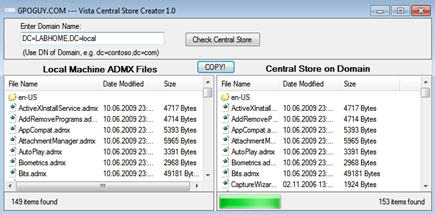
A good alternative for copying the files manually is the Vista Central Store Creator Utility from Darren Mar-Elia which automates the whole process of creating and updating the Central Store.
 **Related Content
**Screencast: How-To Configure the Central ADMX Store
How to create a Central Store for Group Policy Administrative Templates in Window Vista
Group Policy Settings References for Windows and Windows Server
**Related Content
**Screencast: How-To Configure the Central ADMX Store
How to create a Central Store for Group Policy Administrative Templates in Window Vista
Group Policy Settings References for Windows and Windows Server
63EHNFN6ZWK8