When manually downloading a Microsoft Security Update or hotfix for Windows 7 (Vista) you typically get a file with an MSU file extension. A file with an MSU extension is a Microsoft Update Standalone package.
Microsoft Update Standalone Packages are installed through the Windows Update Standalone Installer WUSA.EXE which is located in the C:\Windows\system32 folder. If you need to install many updates you could create a script like the one below.
SET HOTFIXSRC=
But if you are using the System Image Manager and want to include security updates or hotfixes in your unattended Windows 7 installation, you can only select CAB files.
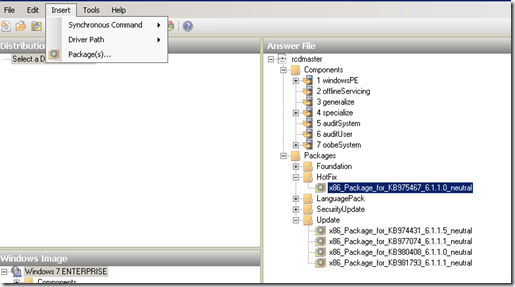 So where are the CAB files? They are included within the MSU file, so all we need to do is extract them. During the Windows Vista timeframe the recommendation was to use the expand.exe utility.
expand -f:* “C:\934307\Windows6.0-KB934307-x86.msu” %TEMP%
In Windows 7 WUSA.EXE has an additional new command line option called “/extract”.
wusa <updatepackage.msu> /extract:c:\temp\cab
To automate the process of extracting the CAB files from several MSU files, I have modified a script that Jason Scheffelmaer shared back in 2007 on MyITForum.
Dim ExtractFolder: ExtractFolder = “Cabs”
Dim fso: Set fso = CreateObject(“Scripting.FileSystemObject”) Dim wshShell: Set wshShell = CreateObject(“Wscript.Shell”)
Dim scriptDir scriptDir = fso.GetParentFolderName(WScript.ScriptFullName)
On Error Resume Next ’ Deleting ExtractFolder subfolder to start clean fso.DeleteFolder ScriptDir & “" & ExtractFolder Err.Clear On Error Goto 0
’ Create Cabs folder, we will put the extracted cabs there. fso.CreateFolder ScriptDir & “" & ExtractFolder
Dim scriptFolder Set scriptFolder = fso.GetFolder(ScriptDir)
dim scriptFolderFiles Set scriptFolderFiles =scriptFolder.Files
Dim file, TotalExtracted
’ Initialize TotalExtracted = 0
’ Loop thru all files in the folder that the script is ran in For Each file in scriptFolderFiles If Right(file.name, 4) = “.msu” Then ‘wscript.echo “Processing " & file.name iRetVal = WshShell.Run(”wusa.exe " & ScriptDir & “" & file.Name & “** /extract:**” & ScriptDir & “" & ExtractFolder, 0, True)
If iRetVal = 0 Then TotalExtracted = TotalExtracted + 1 Else Wscript.echo “An error occurred while trying to extract the cab file from " & file.name & “…” End If End If Next
’ Delete any unneeded wsusscan.cab files from the extractFolder On Error Resume Next fso.DeleteFile ScriptDir & “" & ExtractFolder & “\wsusscan.cab”, True On Error Goto 0
WScript.Echo “A total of " & totalExtracted & " cab files were extracted. Script Complete.”