For my lab environment I use the below described approach to generate random computernames for my clients. The script does the following:
Read the Task Sequence Package Name
Based on the name set the appropriate prefix
Generate a random number between 100 and 1000
Generate the new computer name based on Prefix + random number
To implement this do the following:
Put the script listed below into a package
Add the script to the TS by adding a Run Command Line task after Partition Disk and before Apply Operating System
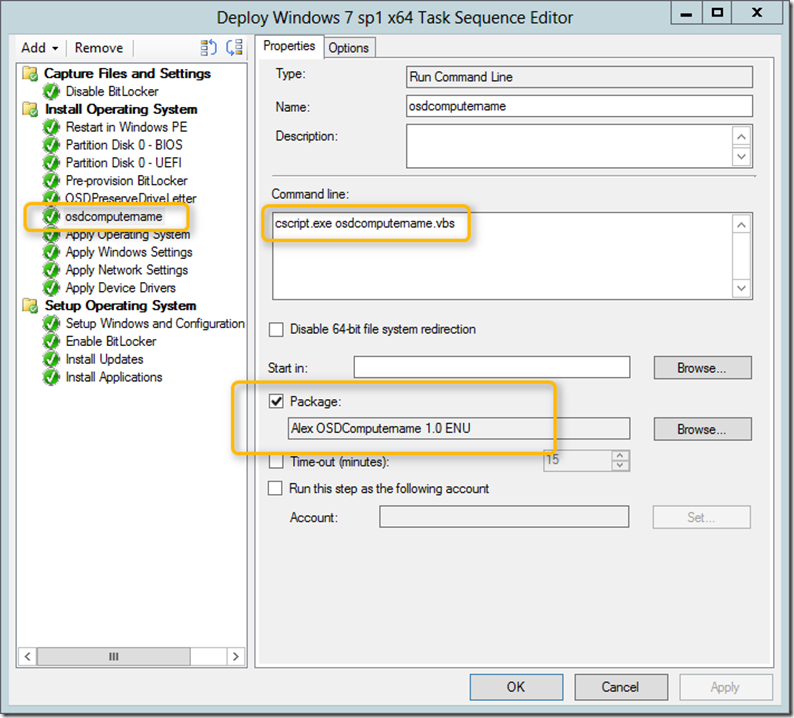
Script: OSDComputername.vbs
[sourcecode language=“vb”] Set env = CreateObject(“Microsoft.SMS.TSEnvironment”) tsname = env("_SMSTSPackageName")
select case tsname case “Deploy Windows 7 sp1 x64” Prefix = “Win7” case “Deploy Windows 8 x64” Prefix = “Win8” case else Prefix = “CL” end select
env(“OSDComputerName”) = RCompName()
Function RCompName() On Error Resume Next Dim CompName : CompName = "" Dim max,min max=1000 min=100 Randomize CompName = "" & Prefix & (Int((max-min+1)*Rnd+min)) oLogging.CreateEntry “Generated random Computername ‘” & CompName & “’”, LogTypeInfo RCompName = CStr(CompName) End Function
[/sourcecode]