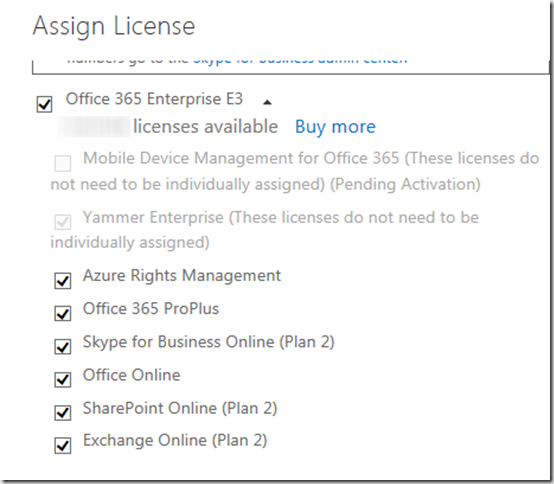
When assigning an Office 365 license to a user, by default several service plans are enabled. When assigning an Office 365 E3 license to a user, the following service plans are enabled by default:
- Azure Rights Management
- Office 365 Pro Plus
- Skype for Business Online (Plan 2)
- Office Online
- SharePoint Online (Plan 2)
- Exchange Online (Plan 2)
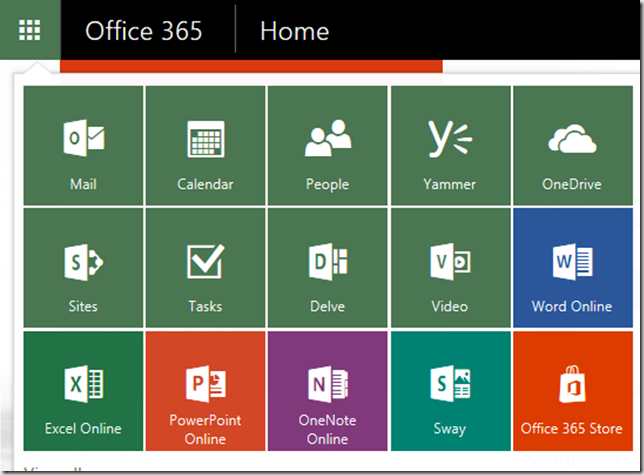
From an end user perspective the user will see the following options when logging on to Office 365.
When looking at the users settings within the Office 365 Admin portal , things look as following:
The below PowerShell function allows an Office 365 user administrator to disable individual services for a registered Office 365 user.
The following command disables the Skype for Business Service
Disable-MsolUserServicePlan alextest@contoso.onmicrosoft.com -ServicePlan SkypeforBusiness

Now doing the same for Exchange and the Office web apps.
Disable-MsolUserServicePlan alextest@contoso.onmicrosoft.com -ServicePlan OfficeWebApps -Verbose
Disable-MsolUserServicePlan alextest@contoso.onmicrosoft.com -ServicePlan Exchange -Verbose
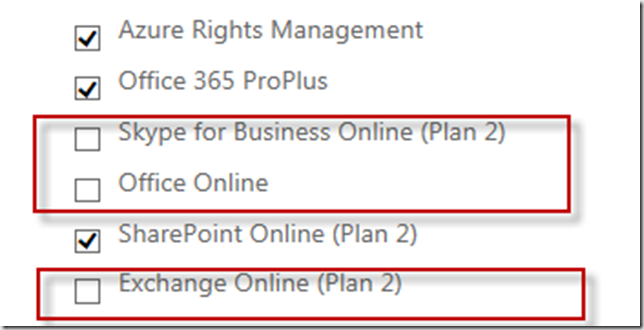
Note, before running the below command, you must connect to Azure Directory using the connect-msolservice cmdlet.
The script can be downloaded from here
**More information: **Working with Office 365 User Licenses Use Office 365 PowerShell to disable access to services
function Disable-MsolUserServicePlan
{
<#
.Synopsis
   Disables an Office 365 Service Plan for a user
.DESCRIPTION
   The Disable-MsolUserServicePlan cmdlet disables an Office 365 Service Plan for the specified user.
   When assigning an Office 365 E3 license to a user, by default the following Service plans are enabled
   RMS_S_ENTERPRISE, OFFICESUBSCRIPTION,MCOSTANDARD,SHAREPOINTWAC,SHAREPOINTENTERPRISE,EXCHANGE_S_ENTERPRISE
   Azure Rights Management, Office Pro Plus, Skype for Business, Office Web Apps, Sharepoint, Exchange
   Use the Disable-MsolUserServicePlan to disable an individual Service Plan.
   This cmdlet requires the Azure Directory PowerShell module
   https://technet.microsoft.com/library/jj151815.aspx#bkmk_installmodule
   Connect to Azure Directory first before using this cmdlet
   Connect-MsolService
.PARAMETER UserPrincipalName
  The user ID of the user to retrieve.
.PARMAETER ServicePlan
 The Service Plan to disable
.EXAMPLE
    Disable-MsolUserServicePlan -UserPrincipalName john.doe@contoso.onmicrosoft.com -ServicePlan SkypeforBusiness
    This command disables Skype for Business for user John Doe
.EXAMPLE
    Disable-MsolUserServicePlan -UserPrincipalName john.doe@contoso.onmicrosoft.com -ServicePlan Exchange
    This command disables Exchange for user John Doe
.NOTES
    Created by Alex Verboon, 13. Dec. 2015
    https://msdn.microsoft.com/en-us/library/dn568014.aspx
    https://technet.microsoft.com/en-us/library/dn771769.aspx
#>
[CmdletBinding(SupportsShouldProcess=$true)]
    Param
    (
        [Parameter(Mandatory=$true,
            ValueFromPipelineByPropertyName=$true,HelpMessage="The users office 365 principalname",
            Position=0)]
        [string]$UserPrincipalName,
        [Parameter(Mandatory=$true,
            ParameterSetName = "ServicePlan",
            ValueFromPipelineByPropertyName=$true,
            Position=1)]
            [ValidateSet("SkypeforBusiness","OfficeWebApps","SharePoint","Exchange","OfficeProfessionalPlus","AzureRightsManagement")]
        [string]$ServicePlan
    )
    Begin
    {
       $AccountSkuID = (Get-MsolAccountSku | Where {$_.SkuPartNumber -eq "ENTERPRISEPACK"}).AccountSkuId
            switch($ServicePlan)
            {
                "SkypeforBusiness" {$planname = "MCOSTANDARD"}
                "OfficeWebApps" { $planname = "SHAREPOINTWAC"}
                "SharePoint" {$planname = "SHAREPOINTENTERPRISE"}
                "Exchange" {$planname = "EXCHANGE_S_ENTERPRISE"}
                "OfficeProfessionalPlus" {$planname = "OFFICESUBSCRIPTION"}
                "AzureRightsManagement" {$planname = "RMS_S_ENTERPRISE"}
              }
             Write-Verbose "Selected plan to disable: $planname"
             $ouser = Get-MsolUser -UserPrincipalName $UserPrincipalName -ErrorAction SilentlyContinue
            if ($ouser -ne $null)
            {
                $ouserlicense = $ouser.Licenses | Select-Object -ExpandProperty ServiceStatus
                $DisabledServices = ($ouserlicense | Where-Object -Property ProvisioningStatus -EQ "Disabled").ServicePlan.ServiceName
                Write-verbose "Current Disabled Service Plans: $DisabledServices"
                $EnabledServices = ($ouserlicense | Where-Object -Property ProvisioningStatus -EQ "Success").ServicePlan.ServiceName
                Write-verbose "Current Enabled Service Plans: $EnabledServices"
            }
            Else
            {
                Write-Error "User $UserPrincipalName does not exist"
                break
            }
    }
    Process
    {
           If ($DisabledServices -contains $planname -eq $true)
            {
                Write-output "The Service plan DisableServicePlan is already disabled for user $UserPrincipalName"
            }
            Else
            {
                If ($DisabledServices.Count -eq 0)
                {
                    $DisabledServicesNew = $planname
                }
                Else
                {
                    $DisabledServicesNew = {$DisabledServices}.Invoke()
                    $DisabledServicesNew.Add("$planname")
                }
                $LicenseOptions = New-MsolLicenseOptions -AccountSkuId "$AccountSkuID" -DisabledPlans $DisabledServicesNew
                Write-Verbose "New Disabled Service Plans: $($LicenseOptions.DisabledServicePlans)"
                If ($PScmdlet.ShouldProcess("Disabling Service Plan $planname for user$UserPrincipalName"))
                {
                    Set-MsolUserLicense -UserPrincipalName "$UserPrincipalName" -LicenseOptions $LicenseOptions
                }
            }
        }
     End{}
}