Yesterday I deployed a computer with ConfigMgr and then wondered why it got certain software installed. And so another script was born.
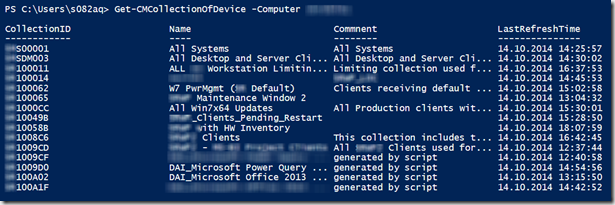
The Get-CMCollectionOfDevice command retrieves all collections where the specified device has a membership
The Script can be downloaded from here
<#
.SYNOPSIS
    Get-CMCollectionOfDevice retrieves all collections where the specified device has a membership
.DESCRIPTION
    The Get-CMCollectionOfDevice retrieves all collections where the specified device has a membership
.PARAMETER Computer
    The name of the computer device
    Example: Client01
.PARAMETER SiteCode
    The Configuration Manager Site Code
    Example: PRI
.PARAMETER SiteServer
    The computer name of the Configuration Manager Site Server
    Example: Contoso-01
.EXAMPLE
    Get-CMCollectionOfDevice -Computer Client01
    CollectionID                  Name                          Commnent                      LastRefreshTime
    ------------                  ----                          --------                      ---------------
    SMS00001                      All Systems                   All Systems                   14.10.2014 14:25:57
    SMSDM003                      All Desktop and Server Cli... All Desktop and Server Cli... 14.10.2014 14:30:02
    PR100011                      ALL Contoso  Workstation Lim. Limiting collection used f... 14.10.2014 16:37:53
    PR100014                      Zurich                        Location Zuerich              14.10.2014 14:45:53
    The above command lists all collections where computer Client01 is a member of. The default
    parameter values for SiteCode and SiteServer defined in the script are used.
.EXAMPLE
    Get-CMCollectionOfDevice -Computer Client01 -SiteCode PRI -SiteServer Contoso-01
    The above command lists all collections where computer Client01 is a member of within the
    Configuration Manager site PRI connecting to Site Server Contoso-01
.NOTES
    Version 1.0 , Alex Verboon
    Credits to Kaido Järvemets and David O'Brien for the code snippets
#>
function Get-CMCollectionOfDevice
{
    [CmdletBinding()]
    [OutputType([int])]
    Param
    (
        # Computername
        [Parameter(Mandatory=$true,
                   ValueFromPipelineByPropertyName=$true,
                   Position=0)]
        [String]$Computer,
        # ConfigMgr SiteCode
        [Parameter(Mandatory=$false,
                   ValueFromPipelineByPropertyName=$true,
                   Position=1)]
        [String]$SiteCode = "PRI",
        # ConfigMgr SiteServer
        [Parameter(Mandatory=$false,
                   ValueFromPipelineByPropertyName=$true,
                   Position=2)]
        [String]$SiteServer = "contoso-01.corp.com"
    )
Begin
{
    [string] $Namespace = "root\SMS\site_$SiteCode"
}
Process
{
    $si=1
    Write-Progress -Activity "Retrieving ResourceID for computer $computer" -Status "Retrieving data"
    $ResIDQuery = Get-WmiObject -ComputerName $SiteServer -Namespace $Namespace -Class "SMS_R_SYSTEM" -Filter "Name='$Computer'"
    If ([string]::IsNullOrEmpty($ResIDQuery))
    {
        Write-Output "System $Computer does not exist in Site $SiteCode"
    }
    Else
    {
    $Collections = (Get-WmiObject -ComputerName $SiteServer -Class sms_fullcollectionmembership -Namespace $Namespace -Filter "ResourceID = '$($ResIDQuery.ResourceId)'")
    $colcount = $Collections.Count
    $devicecollections = @()
    ForEach ($res in $collections)
    {
        $colid = $res.CollectionID
        Write-Progress -Activity "Processing  $si / $colcount" -Status "Retrieving Collection data" -PercentComplete (($si / $colcount) * 100)
        $collectioninfo = Get-WmiObject -ComputerName $SiteServer -Namespace $Namespace -Class "SMS_Collection" -Filter "CollectionID='$colid'"
        $object = New-Object -TypeName PSObject
        $object | Add-Member -MemberType NoteProperty -Name "CollectionID" -Value $collectioninfo.CollectionID
        $object | Add-Member -MemberType NoteProperty -Name "Name" -Value $collectioninfo.Name
        $object | Add-Member -MemberType NoteProperty -Name "Commnent" -Value $collectioninfo.Comment
        $object | Add-Member -MemberType NoteProperty -Name "LastRefreshTime" -Value ([Management.ManagementDateTimeConverter]::ToDateTime($collectioninfo.LastRefreshTime))
        $devicecollections += $object
        $si++
    }
} # end check system exists
}
End
{
    $devicecollections
}
}