While browsing through the MDT 2012 scripts, I noticed that here and there MDT uses functions included in the Microsoft.BDD.Utility.dll which is loaded by ZTIUtility.vbs. A good example is the ZTIGather.wsf where the following function is used to determine whether the system is running UEFI or native BIOS.
' Determine if we are running UEFI
bIsUEFI = FALSE
On Error Resume Next
bIsUEFI = oUtility.BDDUtility.IsUEFI
On Error Goto 0
So I took Nir Sofer’s DLL Export Viewer to find out what other functions are included in Microsoft.BDD.Utility.dll
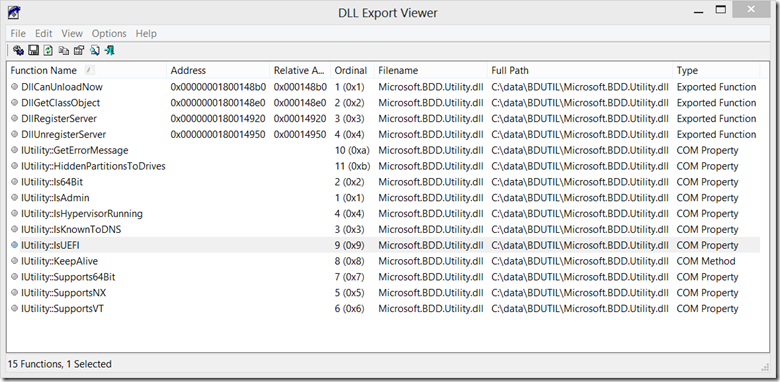
The below table lists the functions included.
| Function | Description |
|---|---|
| GetErrorMessage | (no references found in scripts) |
| HiddenPartitionsToDrives | Creates an array of all local partitions, including hidden ones such as the Recovery partition |
| Is64Bit | If the processor is running a x86 OS, then there is still the possibility that it can support a x64 OS. We need to run a quick processor check to see if it supports x64. |
| IsAdmin | Validate we are running as an administrator |
| IsHypervisorRunning | Get virtualization details |
| IsKnownToDNS | (no references found in scripts and couldn’t figure how to call this function) |
| IsUEFI | Detect whether system uses UEFI or BIOS |
| KeepAlive | Used in MDT scripts to prevent the system from going into sleep while the task sequence is running. |
| Supports64Bit | Checks whether system supports 64 Bit |
| SupportsNX | Checks whether system supports NX |
| SupportsVT | Checks whether the system supports Virtualization Technology |
To make use of these functions outside of the MDT framework, you need the Microsoft.BDD.Utility.dll that is stored under
Below is a simple wsh script that demonstrates the return values of some of the functions listed above.
' utilityfunctions.vbs
Set oShell = CreateObject("WScript.Shell")
sBDDUtility = ScriptDir & "\Microsoft.BDD.Utility.dll"
oShell.Run "regsvr32.exe /s """ & sBDDUtility & """", 0, true
Set oBDDUtility = CreateObject("Microsoft.BDD.Utility")
Set BDDUtility = oBDDUtility
bIsUEFI = FALSE
bIsUEFI = BDDUtility.IsUEFI
bIsAdmin = FALSE
bIsAdmin = BDDUtility.IsAdmin
bIsHyperVirsorRunning = FALSE
bIsHyperVirsorRunning = BDDUtility.IsHypervisorRunning
bSupportsNX = FALSE
bSupportsNX = BDDUtility.SupportsNX
bSupportsVT = FALSE
bSupportsVT = BDDUtility.SupportsVT
bSupports64Bit = FALSE
bSupports64Bit = BDDUtility.Supports64Bit
bIs64Bit = FALSE
bIs64Bit = BDDUtility.Is64Bit
wscript.echo "UEFI: " & bIsUEFI
wscript.echo "Is Admin: " & bIsAdmin
wscript.echo "Is HyperVisor Running: " & bIsHyperVirsorRunning
wscript.echo "Supports NX: " & bSupportsNX
wscript.echo "Supports VT: " & bSupportsVT
wscript.echo "Supports 64 Bit: " & bSupports64Bit
wscript.echo "Is 64 Bit: " & bIs64Bit
Function ScriptDir
 ScriptDir = Left(WScript.ScriptFullName,Len(WScript.ScriptFullName) - Len(WScript.ScriptName) -1)
End Function