I’ve had this on my “must do some hands on” list for months, finally found some time to play a bit with the new PowerShell Group Policy CmdLets that where introduced with Windows 7. For today i decided to work with the Get-GPO and the Get-GPOReport CmdLets.
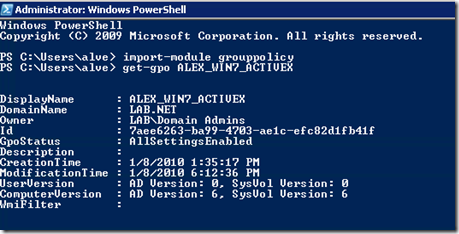
The Get-GPO CmdLet allows you to list one or all GPOs that exist in a domain. If you know the name and want to know when it was last modified, simply type Get-GPO
The Get-GPOReport CmdLet allows you to create a detailed Group Policy report and save it in HTML or XML format. To generate a report that contains all GPOs with all its settings, simply run the following command:
[sourcecode language=“powershell”] get-gporeport -all -path c:\gporeports\allgpo.html -reporttype HTML [/sourcecode]
Below are two scripts I modified / created during my first hands-on with the Group Policy CmdLets.
The first script GenerateGroupPolicyReports.ps1 is basically a copy from Get-XMLForEachGPO.ps1 that i found on TechNet Script Center. I’ve just changed the output type from XML to HTML. The script produces a Group Policy report for each GPO found in the domain.
GenerateGroupPolicyReports.ps1
[sourcecode language=“powershell”] # import Group Policy Module Import-Module -Name grouppolicy
First Create the GPOReports Folder
if (Test-Path C:\GPOReports) { “C:\GPOReports Folder already exists exists” } else { “C:\GPOReports does not exist, create it” New-Item C:\GPOReports -type directory -Force }
now generate the reports
$path = “C:\GPOReports” get-gpo -All | ForEach-Object { write-host “Generating GPO Report for:” $($_.displayname)
Get-GPOReport -Name $.displayname -ReportType HTML -Path (join-path -Path $path -ChildPath “$($.displayname).HTML”) }
displayname -ReportType HTML -Path (join-path -Path $path -ChildPath “$($_.displayname).HTML”) }
[/sourcecode]
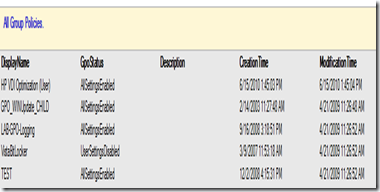
The second script I put together simply lists all GPOs that exist in the domain and generates an HTML report.
GenerateGroupPolicySummaryReport.ps1
[sourcecode language=“powershell”] # import Group Policy Module Import-Module -Name grouppolicy
First Create the GPOReports Folder
if (Test-Path C:\GPOReports) { “C:\GPOReports Folder already exists exists” } else { “C:\GPOReports does not exist, create it” New-Item C:\GPOReports -type directory -Force }
now generate the summary report
$a = “”
get-gpo -all | Select-object Displayname,GpoStatus, Description,CreationTime, ModificationTime | ConvertTo-HTML -head $a -body “
All Group Policies.
" | Out-file C:\GPOReports\GPOSummary.html[/sourcecode]
The output of the above script looks as following.